


Your Guide to How to Register My Drone

Before you even think about your first flight, there's a crucial step you can't skip: getting your drone registered. In the U.S., this all happens through the FAA's official DroneZone website. But it's not a one-size-fits-all process. How you register depends entirely on whether you're flying for fun or for work. Getting this right from the very beginning is simply non-negotiable for any responsible pilot.
Why and When You Need to Register Your Drone
Think of drone registration like getting a license plate for your car. It’s a simple system that brings a much-needed level of accountability and safety to our skies, ensuring every drone can be traced back to its owner. This isn't just about jumping through bureaucratic hoops; it's a fundamental piece of the puzzle for safely integrating drones into the national airspace.
The Federal Aviation Administration (FAA) put these rules in place for a very good reason. With well over a million drones buzzing around, the potential for incidents—from privacy violations to dangerous interference with manned aircraft—is very real. In fact, as of early 2025, FAA data shows a staggering 420,825 drones registered for commercial use and another 383,007 for recreational flying. You can dig into these official stats yourself right on the FAA's website.
Recreational vs Commercial Registration
The first question you have to ask yourself is: why am I flying this drone? Your answer will put you on one of two very different paths with the FAA, and picking the right one is essential for staying compliant.
To make it even clearer, let's break down the key differences to help you figure out where you land.
Recreational vs Commercial (Part 107) Registration at a Glance
This table offers a quick comparison to help you determine which drone registration category applies to you based on your intended use.
Attribute | Recreational Registration (Fly for Fun) | Commercial Registration (Part 107) |
|---|---|---|
Primary Purpose | Personal enjoyment, hobby, and educational use only. No compensation involved. | Flying for work, business, or any form of payment or economic benefit. |
Pilot Requirement | Must pass The Recreational UAS Safety Test (TRUST). | Must obtain a Part 107 Remote Pilot Certificate. |
Registration Method | Register yourself once as a pilot. This single registration covers all drones you own. | Each individual drone must be registered separately. |
Registration Fee | A single, low fee ($5) for a 3-year registration. | A separate fee ($5) for each drone registered for 3 years. |
Example Scenarios | Taking photos on vacation, flying in your backyard, capturing family videos. | Real estate photography, wedding videography, construction site surveys, monetized YouTube videos. |
Hopefully, that table clears things up. The distinction is incredibly important.
Flying for Fun (Recreational): This path is for hobbyists—people flying purely for the fun of it. If you're just capturing some cool shots on vacation or zipping around a park for personal enjoyment, this is you. You'll need to pass The Recreational UAS Safety Test (TRUST), and then you just register once to cover every drone you own under a single, low fee.
Flying for Work (Part 107): This is for anyone using a drone as part of a job or to make money. It covers the obvious stuff like real estate photography and agricultural surveys, but also things you might not expect, like monetizing a YouTube channel with your aerial footage. For this route, you need to earn a Part 107 certificate and register each and every drone you operate individually.
Key Takeaway: The moment money or any kind of compensation enters the picture, you've crossed into commercial territory. There's no gray area here. The penalties for flying commercially under a recreational registration can be steep, so it's not worth the risk.
Choosing the right path from day one saves you from future legal headaches and potential fines. It’s the foundational step that ensures you can launch your drone journey with confidence and full legal compliance. For a deeper dive to help you decide, be sure to check out our quick guide to FAA drone registration.
What You Need Before Starting Registration
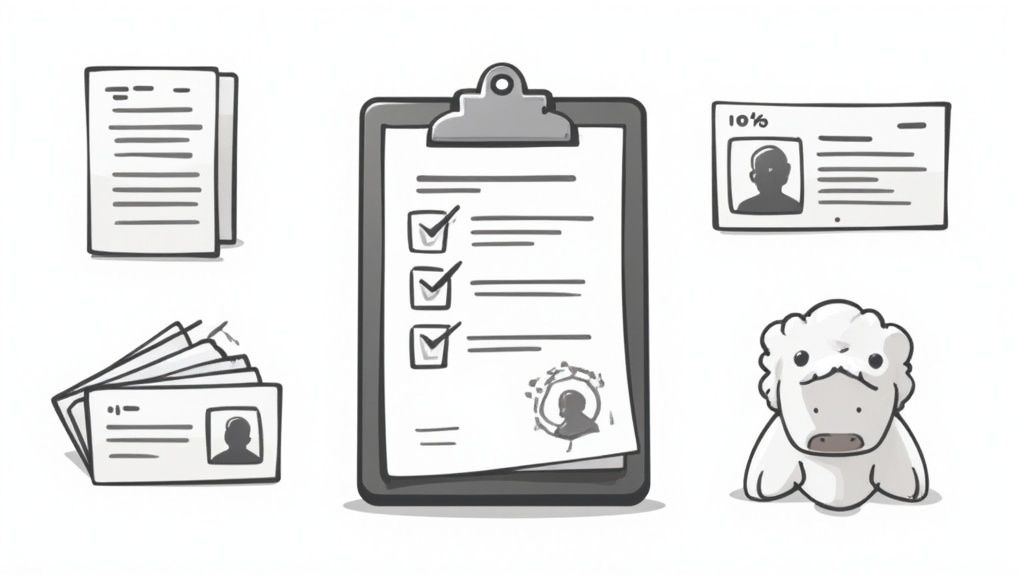
Before you even think about heading over to the official FAA DroneZone website, let's talk prep work. A little bit of organization now can turn what feels like a bureaucratic chore into a simple, ten-minute task. I always tell new pilots to think of it like a pre-flight checklist for your paperwork. Get these few things in order, and you'll sail through the online forms without any of those frustrating pauses to dig up information.
First, you’ll need a few personal details. The FAA will need a valid email address you actually check, as this is where they’ll send your registration certificate and, later on, renewal reminders. You'll also need to provide your physical and mailing addresses, even if they're identical.
Next, have your payment method ready. The FAA registration fee is just $5, and that single payment keeps you covered for a full three years. You’ll need a credit or debit card to handle this online. That $5 fee is the same whether you're a recreational pilot or getting set up for commercial Part 107 operations.
Your Drone's Specific Information
This is the most critical piece of the puzzle. You absolutely need to know the make and model of your drone. If you're flying something like a DJI Mavic 3, that’s exactly what you’ll put into the system.
But what if you've built your own FPV quad or have a drone without a clear brand name? Don't sweat it. The FAA's system is ready for that. When you get to that section, you'll see an option for "home-built" or something similar. Just select that. Knowing this ahead of time prevents you from getting stuck halfway through.
Here's a quick rundown of what to have on your desk before you start:
A valid email address for all official communications.
Your physical and mailing addresses to go on record.
A credit or debit card for the registration fee.
Your drone's make and model (or knowing it's custom-built).
Pro Tip: I always create a quick note on my computer with all this information copied and pasted. It lets you fly through the online form, reduces the chance of typos, and just makes the whole process faster.
Taking these few minutes to prepare makes a world of difference. And for any international pilots visiting the U.S., you'll follow a similar process but must ensure you're following all the FAA rules for your specific type of flying. Getting these details sorted upfront is truly the key to a painless registration.
Navigating the FAA DroneZone Registration Portal
Alright, you’ve got your information ready. Now it’s time to head over to the official FAA DroneZone portal. This government website is the one and only place to legally register your drone in the United States. Don't be put off by the official look; once you know the lay of the land, it's pretty straightforward.
First things first, you'll need to create an account. This is a standard step that sets up your profile with the FAA, giving you a secure spot to manage your drone fleet now and for any future additions. You’ll just need your email and a new password to get started.
Choosing Your Registration Path
Once your account is set up and you're logged in, you'll come to a fork in the road. You must choose to register under The Exception for Recreational Flyers or under Part 107. This is where knowing why you fly is so important.
Here’s a simple breakdown to help you pick the right one:
Recreational Flyers: If you're flying just for the fun of it, this is your path. You'll register yourself as a pilot one time, and the single registration number you get covers every drone you own for hobby flights.
Part 107 Pilots: If your drone is used for anything that makes money or supports a business, you have to register under Part 107. The key difference here is that each drone used for commercial work needs its own, unique registration number.
This isn't a suggestion; it's a hard rule. For instance, if a real estate photographer buys a new DJI Mavic 3 to shoot property listings, they must select Part 107. If a hobbyist buys that exact same drone to film their family vacations, they'd go with the recreational option.
Heads Up: You can't just flip a switch on a registration's type later. A drone registered under Part 107 is always a Part 107 drone in the FAA's eyes. If you start out as a hobbyist and later decide to use that drone for work, you’ll need to go back and complete a brand-new Part 107 registration for that specific aircraft.
Entering Your Drone and Payment Details
After picking your lane, the portal will walk you through putting in your drone's details. You'll need its make, model, and the Remote ID serial number if it has one. If you're flying a custom-built rig, don't worry—the system has an option for that, so you won't get stuck.
Below is what you’ll see when you first land on the FAA DroneZone page. It’s your entry point for this whole process.
The interface is clean and gets straight to the point, designed to get you logged in or signed up quickly so you can move on to the actual registration.
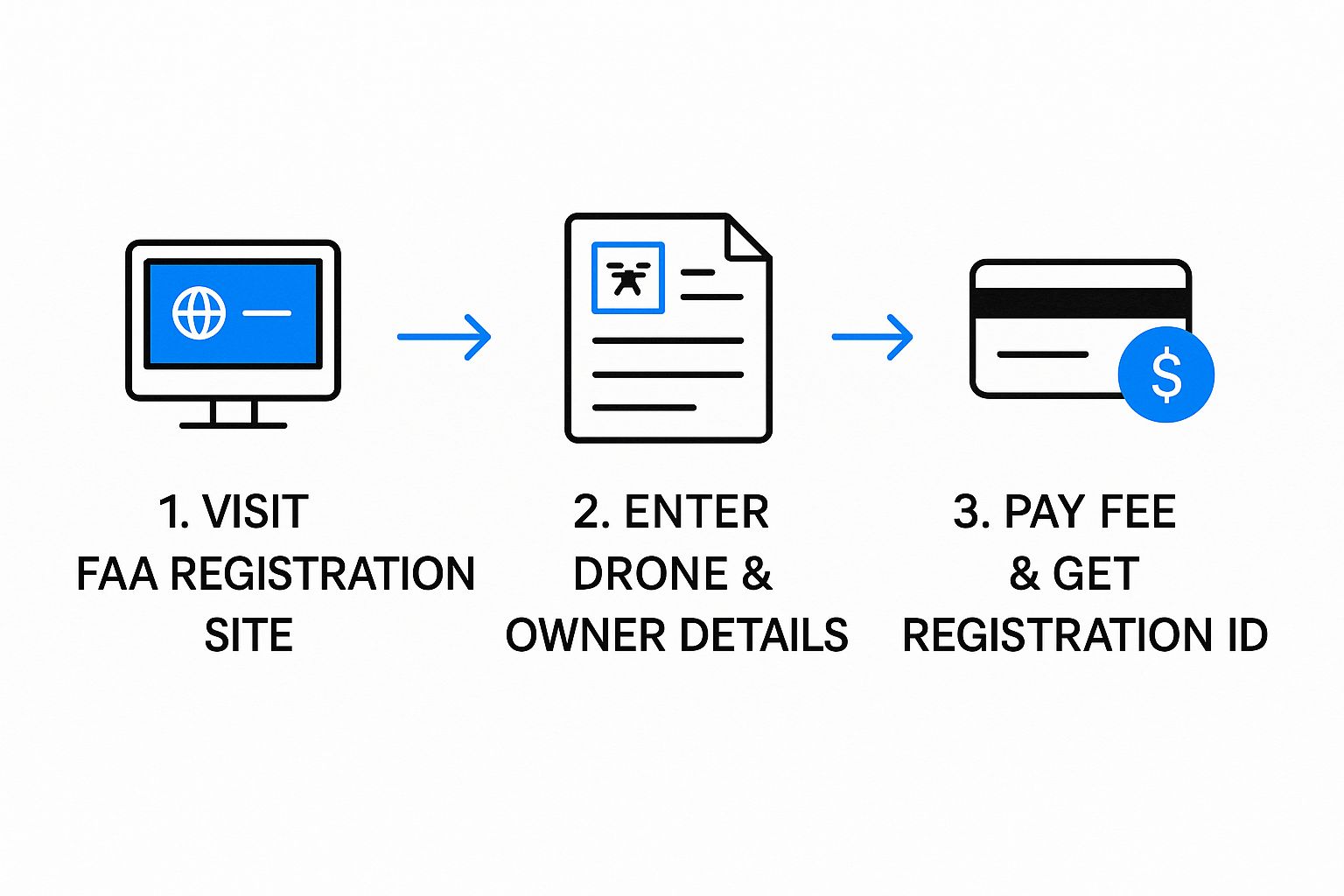
The last piece of the puzzle is paying the $5 registration fee. This small fee keeps your registration valid for three years. The site takes standard credit or debit cards through a secure payment form. As soon as your payment goes through, you’re done! You'll get your registration certificate and FAA number right away.
This infographic really boils it down to three simple actions.
As you can see, it’s a direct path from hitting the website to getting your official number.
When you break it down, the government portal really isn't as intimidating as it first appears. If you want an even deeper dive into the specifics, you can read our complete guide to navigate the FAA registration process like a pro. Taking your time and following these steps will ensure you get this done right on the first try.
Alright, you've jumped through the hoops and officially registered your drone with the FAA. That's a huge first step, but don't get ready for takeoff just yet. Having that registration number in your inbox is one thing; being fully compliant when you're out in the field is another.
Think of that new number as your drone's license plate. It needs to be physically on the aircraft before it ever leaves the ground. The FAA is serious about this—the number has to be easy to read and on an exterior surface of your drone.
Getting Your Drone Labeled Correctly
So, where's the best spot for the label? You need to place it somewhere that's visible without having to take anything apart. The main body or one of the arms is a perfect choice. I've seen some pilots try to stick it inside the battery compartment, but that's a no-go since it's not technically on the exterior.
The material you use for the label matters, too. A simple sticker from a standard label maker is a popular and effective option. Some people even get the number professionally engraved for a more permanent solution. Personally, I lean towards a durable, weatherproof vinyl sticker. It holds up great against minor scrapes and whatever the weather throws at it without fading away.
A Quick Tip: Whatever you choose, be careful about where you place it. Make sure the label isn't covering up any sensors, getting in the way of the propellers, or blocking an antenna. A badly placed sticker can mess with your drone's performance or its safety features.
Always Carry Your Registration Certificate
This next part is non-negotiable: you must have your registration certificate with you every single time you fly. An official from the FAA or even local law enforcement can ask to see it at any time, and you need to be able to produce it.
You've got a couple of options here, and I recommend using both.
A physical copy: Just print it out, fold it up, and keep it in your drone case or wallet. Simple.
A digital version: Saving a PDF or even a screenshot on your smartphone is perfectly fine and super convenient.
Why both? Well, phones die and paper can get lost. Having a digital copy on your phone and a paper backup in your bag is just smart flying. If you ever need a fresh copy, you can always log into your FAA DroneZone account and download it again.
Managing Your Drone Fleet for the Future
Your DroneZone account is more than just a place to get your initial registration. It’s your central hub for staying compliant. This is where you'll go to handle renewals every three years, update your address if you move, or add new drones to your inventory if you're a Part 107 pilot. Keeping this info up-to-date is just as critical as getting registered in the first place.
This whole process is becoming more important every day. The drone world is exploding. Commercial drone sales have skyrocketed, with revenues projected to jump from $0.6 billion in 2016 to an incredible $12.6 billion by 2025. You can dig into these numbers in this detailed drone market analysis.
This massive growth is exactly why these simple compliance steps are so vital for keeping our skies safe. By taking care of these post-registration tasks, you're not just following the rules—you're being a responsible pilot and doing your part for the entire community.
Understanding Drone Laws Beyond Registration
Getting your drone registered is a fantastic first step, but it’s really just the beginning of your journey as a pilot. To be a truly responsible operator, you have to look beyond that registration number and understand the broader rules of the sky. Think of it this way: registration gets you in the door, but knowing the rules is how you fly safely and stay out of trouble.
This stuff matters more than ever. The global drone market is booming, valued at around $43 billion and still climbing. With North America being a huge player thanks to industrial and defense use, it's no surprise that the rules have gotten more serious. You can get a sense of this explosive growth from this detailed drone market report.
Core Rules for Every Pilot
Whether you're flying for fun in your backyard or for a paying client, some rules are non-negotiable. These are the absolute basics that form the foundation of safe flying in the United States.
Altitude Limits: Keep it at or below 400 feet above the ground. This simple rule keeps you safely separated from most planes and helicopters.
Visual Line of Sight (VLOS): This one is simple but crucial. You have to be able to see your drone with your own two eyes at all times. Nope, binoculars or FPV goggles don't count for satisfying this rule.
Giving Way: In the air, drones are at the bottom of the food chain. You must always yield and give way to any manned aircraft. No exceptions.
These aren't just arbitrary regulations; they are fundamental principles designed to prevent accidents and keep our shared airspace predictable and safe for everyone.
Recreational vs. Commercial Pilot Requirements
Once you have those core rules down, the path splits depending on why you're flying. The requirements for a hobbyist are quite different from those for a professional earning money with their drone.
If you're just flying for fun, you need to pass The Recreational UAS Safety Test (TRUST). It’s a free, straightforward online test covering basic safety knowledge. After you pass, you'll get a certificate that you must have on you whenever you fly.
For commercial pilots, the stakes are higher. You're required to get a Part 107 Remote Pilot Certificate from the FAA. This means you have to be at least 16 years old and pass a pretty demanding aeronautical knowledge exam. This certificate is your official license to fly for work.
Key Takeaway: You absolutely have to know which set of rules applies to you. Flying for commercial purposes without a Part 107 certificate can bring serious penalties, so it's vital to get this right from day one.
Another piece of this legal puzzle is Remote ID, which basically acts as a digital license plate for your drone. To get a handle on this critical requirement, make sure to [check out our guide on drone Remote ID requirements and quick compliance tips](https://www.jabdrone.com/post/drone-remote-id-requirements-quick-compliance-tips). Flying legally is about more than a registration number—it’s about being a knowledgeable, safe, and respectful member of the aviation community.
Common Drone Registration Questions Answered
Even after going through the step-by-step process, it’s completely normal to have a few questions rattling around. The world of drone regulations can feel like a maze at first, but thankfully, most of the common sticking points are pretty straightforward.
Let's clear up some of the most frequent questions I get from new pilots just figuring out the registration game.
Do I Have to Register a Drone Under 250 Grams?
This is, without a doubt, the number one point of confusion, especially with so many incredible "mini" drones hitting the market. The answer isn't just about weight—it all comes down to how you plan to fly.
If you are flying purely for fun, as a hobbyist, a drone that weighs less than 250 grams (that's 0.55 pounds) at takeoff does not need to be registered with the FAA. This is a specific exception made just for recreational flyers.
But here’s the critical part: the moment you use that same sub-250g drone for anything non-recreational, registration becomes mandatory. Let's say you use a DJI Mini 4 Pro to snap a few pictures for a buddy's real estate listing. You've just crossed over into commercial use, and that drone must be registered under Part 107, no matter how light it is.
Key Takeaway: Your flying purpose, not just the drone's weight, dictates the rules. Any flight connected to a business or service requires registration.
What Is the Difference Between Part 107 and Recreational Registration?
Getting this right is the foundation of drone compliance. It really boils down to your intent every time you fly.
Recreational Registration: This is for hobbyists flying strictly for personal enjoyment. You register yourself as a pilot one time, pay a single $5 fee, and get one registration number to put on all the drones you own and fly for fun.
Part 107 Registration: This is for any flight tied to a business, compensation, or any non-hobby purpose. Each individual drone used for these flights needs its own unique registration number, and each one costs $5. More importantly, the pilot flying must hold a valid Part 107 Remote Pilot Certificate.
Think of it this way: recreational registration is tied to you, the pilot. Part 107 registration is tied to each specific aircraft. The process for getting a Part 107 certificate is also much more involved than the simple TRUST safety test for hobbyists. If you're thinking about flying for work, our quick guide to drone license requirements breaks down that entire Part 107 certification path.
How Long Does My Registration Last and How Do I Renew It?
Your FAA drone registration is good for three years, and this applies to both recreational and Part 107 registrations. You don't have to set a calendar reminder, either. The FAA will send a courtesy email to the address on your account when it's time to renew.
Renewing is dead simple. Just log back into your FAA DroneZone account, double-check that your personal and drone info is all correct, and pay the $5 renewal fee. It's a quick and painless process designed to keep you compliant.
Where Can I Find My Drone Registration Certificate?
Your certificate is always just a few clicks away. As soon as you finish registering, the FAA gives you a digital copy to download immediately. You can log into your FAA DroneZone account anytime to view it, download a new PDF, or print it out.
Here's my personal tip: keep it in two places. I save the PDF on my smartphone for easy access in the field, and I keep a printed copy tucked away in my drone's carrying case. That way, I'm always covered if an official ever needs to see it.
At JAB Drone, we're committed to providing you with the clear, accurate, and practical information you need to fly safely and responsibly. From understanding the rules to mastering your craft, we have the resources to support your journey. Explore more at https://www.jabdrone.com.
Comments